A sales lead tracker Google Sheets setup is one of the fastest, cheapest ways to organize your pipeline and stop letting deals fall through the cracks.
Here’s what you need to know right now:
- What it is: A Google Sheets spreadsheet that tracks every prospect — their contact info, deal stage, follow-up dates, and deal value — in one place
- Who it’s for: Solo sellers, small teams, or B2B service firms managing 25–75 active leads
- What it costs: $0 — just a free Google account
- How fast you can start: A basic tracker takes under 30 minutes to build from scratch, or under 10 minutes with a free template
- When to move on: Once you’re adding 10+ new leads per week or spending more than 2 hours a week on manual updates, it’s time to look at automation
Information scattered across sticky notes, email threads, and memory is one of the most common reasons deals go cold. A structured tracker fixes that immediately — no software budget required.
I’m REBL Risty, and after 16 years running a B2B agency, I’ve used a sales lead tracker Google Sheets system at nearly every stage of growth — long before we built our own CRM. I’ll show you exactly how to set one up, make it powerful, and know when to graduate beyond it.
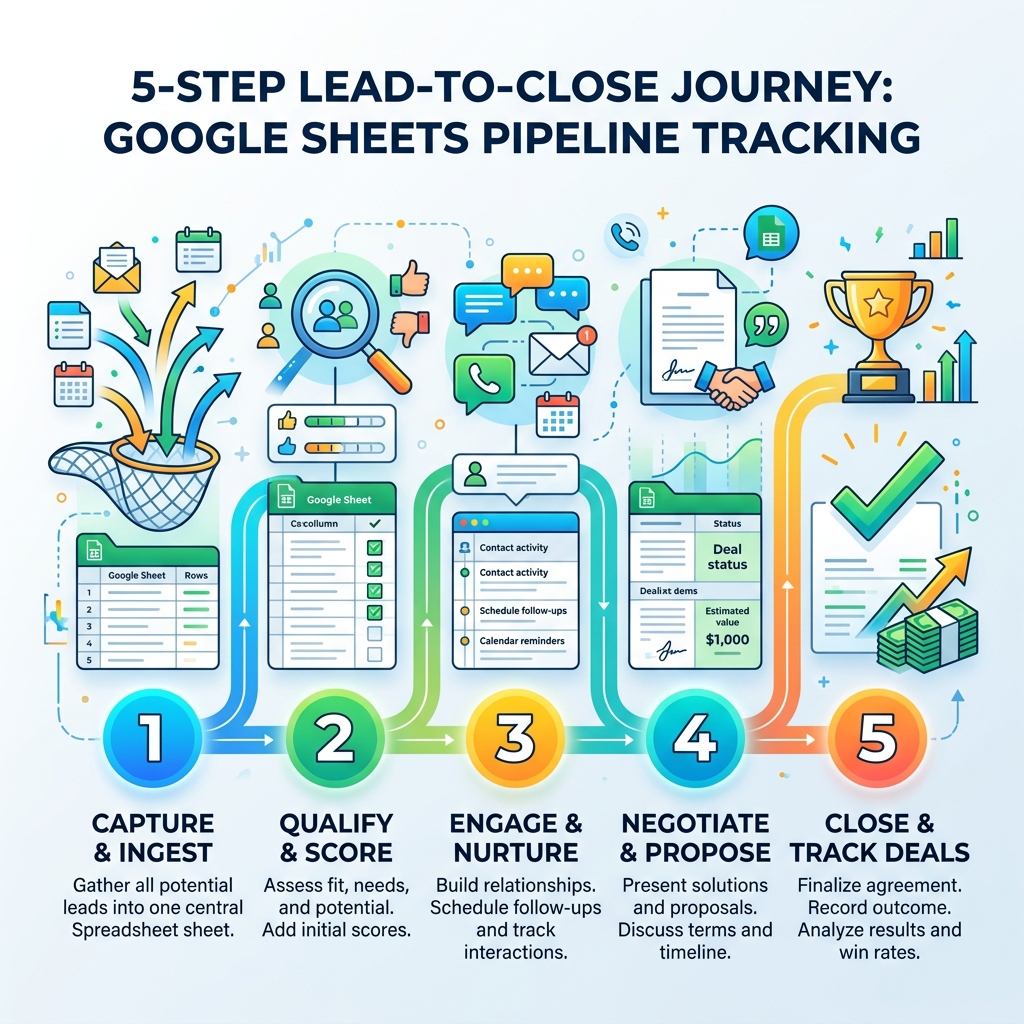
Why Use a Sales Lead Tracker Google Sheets Template?
When you are starting out or running a lean B2B professional services firm, every dollar counts. Choosing a sales lead tracker Google Sheets approach over a high-priced CRM isn’t just about saving money; it’s about agility.
Cost-Efficiency and Zero Barriers
The most obvious benefit is the price tag: free. While enterprise CRMs can cost hundreds of dollars per user monthly, Google Sheets lives within your existing Google Workspace. This allows you to bootstrap your sales process without a financial commitment. Research shows that many professionals use free templates to manage their first 25–75 leads comfortably for the first 2–6 months of their business journey.
Real-Time Collaboration and Cloud Accessibility
We live in a mobile world. Because Google Sheets is cloud-based, your entire team can view and edit the tracker simultaneously. Whether you are at your desk or checking a lead’s status on your phone before a meeting, the data is always live. This level of transparency prevents the dreaded “double-dial,” where two reps accidentally call the same prospect because their notes weren’t synced.
Total Customization
Unlike rigid software, a spreadsheet is a blank canvas. You can add columns for specific niche data points that matter only to your industry. If you want to track a lead’s favorite coffee or the specific software stack they use, you just add a column. This flexibility is vital when you are still building a B2B lead generation machine and haven’t quite finalized your sales stages.
Data Ownership and the Learning Curve
There is virtually no learning curve with a spreadsheet. Most of us have used one at some point. By manually entering data, you actually learn your sales process better. You start to see patterns in why deals stall or which lead sources convert best. This “hands-on” period is an educational phase that prepares you for more advanced AI sales automation.
Essential Components of a High-Performing Tracker
A tracker is only as good as the data you put into it. If you clutter it with too much information, you’ll stop using it. If you include too little, you’ll lose context. To increase sales using AI or manual methods, you need a clean foundation.
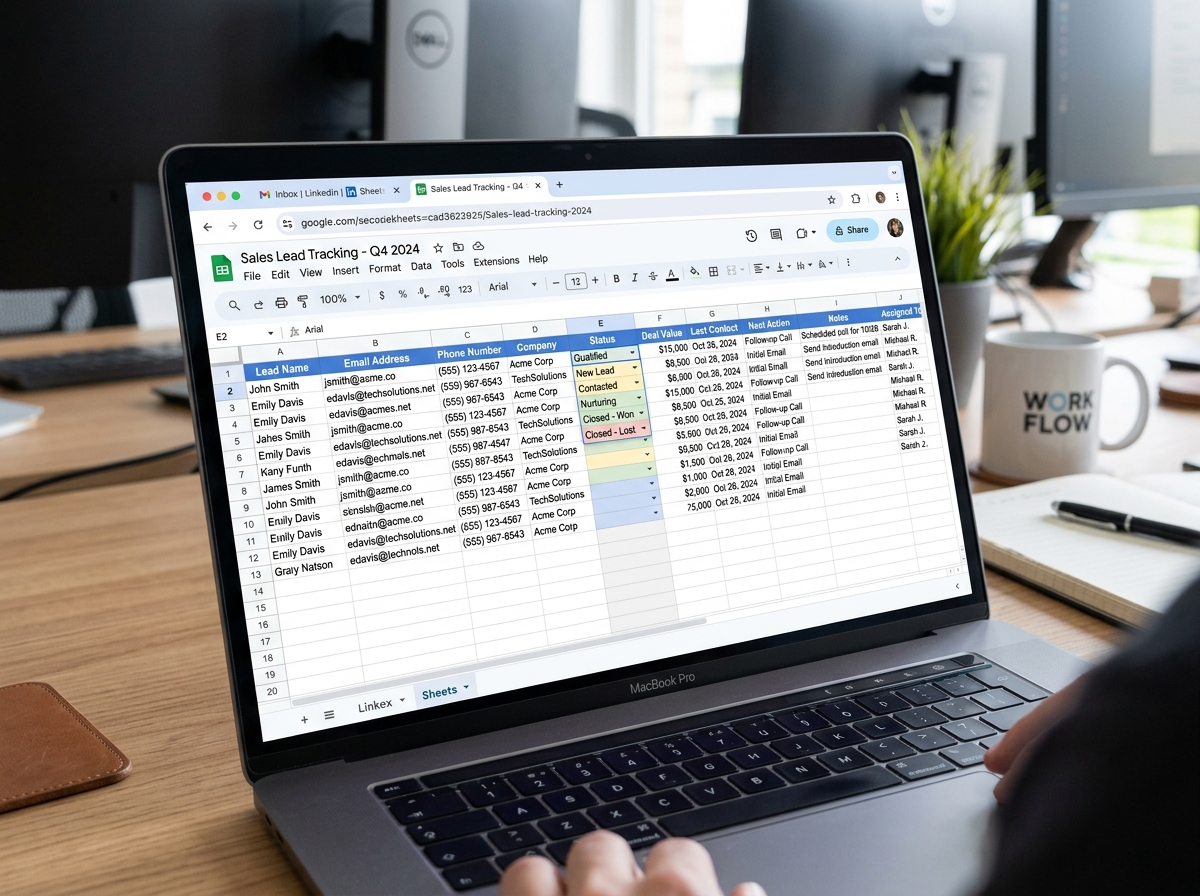
Lead Prioritization and Pipeline Stages
Not all leads are created equal. Some are ready to buy today, while others need more nurturing. Your tracker should clearly distinguish between these. We recommend using a “Status” or “Stage” column with a dropdown menu to keep things consistent. Common stages include:
- New Lead: Just entered the system.
- Contacted: Initial outreach performed.
- Qualified: They have the budget and the need.
- Proposal Sent: The ball is in their court.
- Closed-Won: Time to celebrate!
- Closed-Lost: A learning opportunity.
Core Fields for Your Sales Lead Tracker Google Sheets
To maintain a high-performing tracker, ensure these core fields are present:
- Lead ID: A unique identifier to prevent confusion between similar company names.
- Contact Information: Name, email, and phone number (pro tip: add an apostrophe before phone numbers starting with ‘+’ to keep Sheets from breaking the formatting).
- Lead Source: Where did they come from? (LinkedIn, Referral, Website, Cold Outreach).
- Estimated Deal Value: A “best guess” at the revenue potential.
- Win Probability: A percentage (0–100%) reflecting how likely the deal is to close.
- Last Contact Date: When did you last speak?
- Next Action: This is the most critical field. Every lead must have a “Next Action” (e.g., “Send follow-up email” or “Schedule demo”).
- Notes: A space for context—pain points, objections, or personal details.
Step-by-Step: Building Your Tracker from Scratch
Building your own sales lead tracker Google Sheets is a satisfying 30-minute project. Here is how we recommend doing it to ensure maximum usability.
1. Create and Format the Basics
Open a new sheet and name it clearly (e.g., “2026 Sales Pipeline – Your Business Name”). Type your headers in the first row. Once done, go to View > Freeze > 1 Row. This keeps your headers visible even when you have hundreds of leads to scroll through.
2. Use Data Validation for Dropdowns
Consistency is the enemy of chaos. If one rep types “In Progress” and another types “Pending,” your reporting will break.
- Select your “Status” column.
- Go to Data > Data Validation.
- Select Add Rule and choose Dropdown.
- Enter your stages (New, Contacted, Qualified, etc.).
This ensures everyone uses the same terminology, making it easier to use AI lead generation tools later to analyze your data.
3. Track Lead Aging
How long has that lead been sitting in “Proposal Sent”? You can calculate this automatically. In a new column titled “Days in Pipeline,” use the formula =IF(A2<>"", TODAY()-B2, "") (assuming B2 is the “Date Added” cell). This tells you exactly how “stale” a lead has become.
Advanced Features for Your Sales Lead Tracker Google Sheets
Once the basics are down, you can add “smart” features that mimic a real CRM.
- Conditional Formatting: This is a game-changer for visual learners. Set a rule where the “Status” cell turns Green for “Closed-Won,” Red for “Closed-Lost,” and Orange for “Proposal Sent.”
- Automated Follow-up Reminders: You can use a formula to highlight overdue tasks. For example, if your “Next Action Date” is in column K, apply conditional formatting with the custom formula
=AND(ISBLANK($K2)=FALSE, $K2<=TODAY()). This will turn the cell red the moment a follow-up is missed. - Email Notifications: You can even install a free add-on to receive email alerts when a follow-up is due, ensuring you stay on top of your sales outreach strategies.
- Pivot Tables for Reporting: Don't just look at rows; look at the big picture. Create a Pivot Table to see your "Total Pipeline Value" or "Leads by Source." This turns a simple list into a powerful decision-making tool.
Best Practices for Effective Lead Management
A spreadsheet is only effective if it’s accurate. Poor data hygiene is the "silent killer" of sales pipelines. Here is how we keep our trackers humming:
Establish a Daily Cadence
Lead tracking must become a habit. We recommend a 15-minute "Pipeline Scrub" every morning. Update your statuses, move dates, and ensure every lead has a "Next Action." If a lead doesn't have a next step, it’s not being managed; it’s just sitting in a list.
Keep it Minimalist
It’s tempting to add 50 columns for every possible detail. Don't. Every extra column is an extra hurdle to data entry. If you find you haven't filled out a specific column in a month, delete it. A lean, 10-column sheet that is 100% updated is better than a 40-column sheet that is half-empty.
Sorting and Prioritizing
Regularly sort your sheet by "Next Action Date" or "Win Probability." This forces the most urgent or most valuable deals to the top of your view. Focus your energy where the money is.
| Feature | Manual Entry (Sheets) | Automated Capture (AI) |
|---|---|---|
| Setup Cost | $0 | Variable |
| Maintenance | 1-2 hours / week | < 20 mins / week |
| Lead Capacity | 25-75 leads | Unlimited |
| Accuracy | High (Human verified) | Very High (Real-time sync) |
| Best For | Early stage / Bootstrapping | Scaling / High volume |
To take this a step further, you can even use automated client outreach techniques to feed data directly into your sheet, reducing the manual burden.
When to Upgrade to AI-Powered Automation
Google Sheets is a fantastic starting point, but it isn't a forever home for a growing business. There comes a point where the "free" tool starts costing you more in wasted time than a paid tool would cost in subscription fees.
The Threshold of Fatigue
When you find yourself spending more than 2 hours a week just moving data around, you’ve reached the limit. Statistics show that while a spreadsheet handles 25–75 leads well, maintenance time jumps significantly once you cross that mark. If you are adding more than 10 new leads per week, manual entry will inevitably lead to errors.
Complex Reporting and Integration
If you need to know your "Customer Acquisition Cost" or "Average Sales Cycle Length" across different regions, Google Sheets formulas can become incredibly complex and prone to breaking. Furthermore, if you want your lead tracker to "talk" to your email marketing or billing software, you’ll likely need the prospecting secrets of AI.
Scaling the Team
A spreadsheet works for 1–3 people. Once you have a larger team of sales managers, account executives, and SDRs, the risk of someone accidentally deleting a formula or overwriting a colleague's notes becomes too high. Dedicated systems offer "audit logs" and permissions that protect your most valuable asset: your data.
Frequently Asked Questions about Google Sheets Lead Tracking
How many leads can a Google Sheet comfortably handle?
While Google Sheets can technically hold millions of cells, it becomes sluggish for sales tracking after about 100–150 active leads. For most small B2B firms, it is the perfect tool for the first 50–75 leads. Beyond that, the manual effort required to keep the data fresh usually outweighs the cost of a dedicated system.
Can I automate lead capture from my website into Google Sheets?
Yes! You can use tools like Google Forms or third-party connectors to send website inquiries directly into a new row in your sheet. This ensures you never miss a lead and eliminates the need to copy-paste data from your email inbox.
Is Google Sheets secure enough for sensitive B2B lead data?
Google Sheets uses the same security infrastructure as the rest of Google Workspace, which is trusted by Fortune 500 companies. However, security is only as good as your permissions. Always use "Two-Factor Authentication" (2FA) and be extremely careful about giving "Editor" access to external parties. Stick to "View Only" for anyone who doesn't need to change data.
Conclusion
A sales lead tracker Google Sheets system is the ultimate "starter kit" for any B2B professional services firm. it brings order to the chaos, prioritizes your revenue-generating activities, and costs you nothing but a little bit of time. It’s the perfect way to "learn the ropes" of sales management before you commit to complex software.
At REBL Labs, we specialize in helping firms move beyond the limitations of manual tracking. Our AI-powered teammates work 24/7 to automate these very tasks—capturing leads, nurturing prospects, and updating your systems—so you can focus on the high-level strategy that grows your business. When you’re ready to cut costs and boost revenue without the learning curve of traditional software, we’re here to help you scale.
Ready to see how the pros do it? Check out our AI Sales Automation Complete Guide to see what’s possible when you’re ready to graduate from the spreadsheet.

Meet REBL, the AI expert and CEO of REBL Labs AI. She’s the go-to AI authority who helps businesses navigate the future of marketing automation. Known for making AI approachable and actionable, REBL is a sought-after speaker in the AI space, turning complex tech into business wins. She’s here to ensure that every business can scale smarter, faster, and with zero guesswork.