Pippit AI is a free AI-powered content creation platform developed by ByteDance — the company behind TikTok and CapCut — that lets you generate professional marketing videos, product images, and digital avatars from a single text prompt or product link.
Here’s what you need to know at a glance:
- What it is: An AI creative agent for video, image, and avatar generation
- Who made it: ByteDance (parent company of TikTok and CapCut), launched May 2025
- Who it’s for: E-commerce sellers, marketers, small business owners, and content creators
- Free plan: 150 credits per week — enough for ~2 minutes of video or 75 images
- Paid plan: Starts at $24.17/month (billed annually)
- Commercial use: Yes, content from both free and paid plans is cleared for commercial use
- Languages: 20+ languages with 50+ AI voices
- Key AI models: Seedance, Seedream, Nano Banana Pro
If you’ve ever spent hours (or hired someone) to produce a single product video, you already know the problem. Content creation for social commerce is slow, expensive, and hard to scale. Platforms like TikTok and Instagram demand a constant stream of fresh visuals — and keeping up with that manually is exhausting.
That’s exactly the gap Pippit AI was built to close.
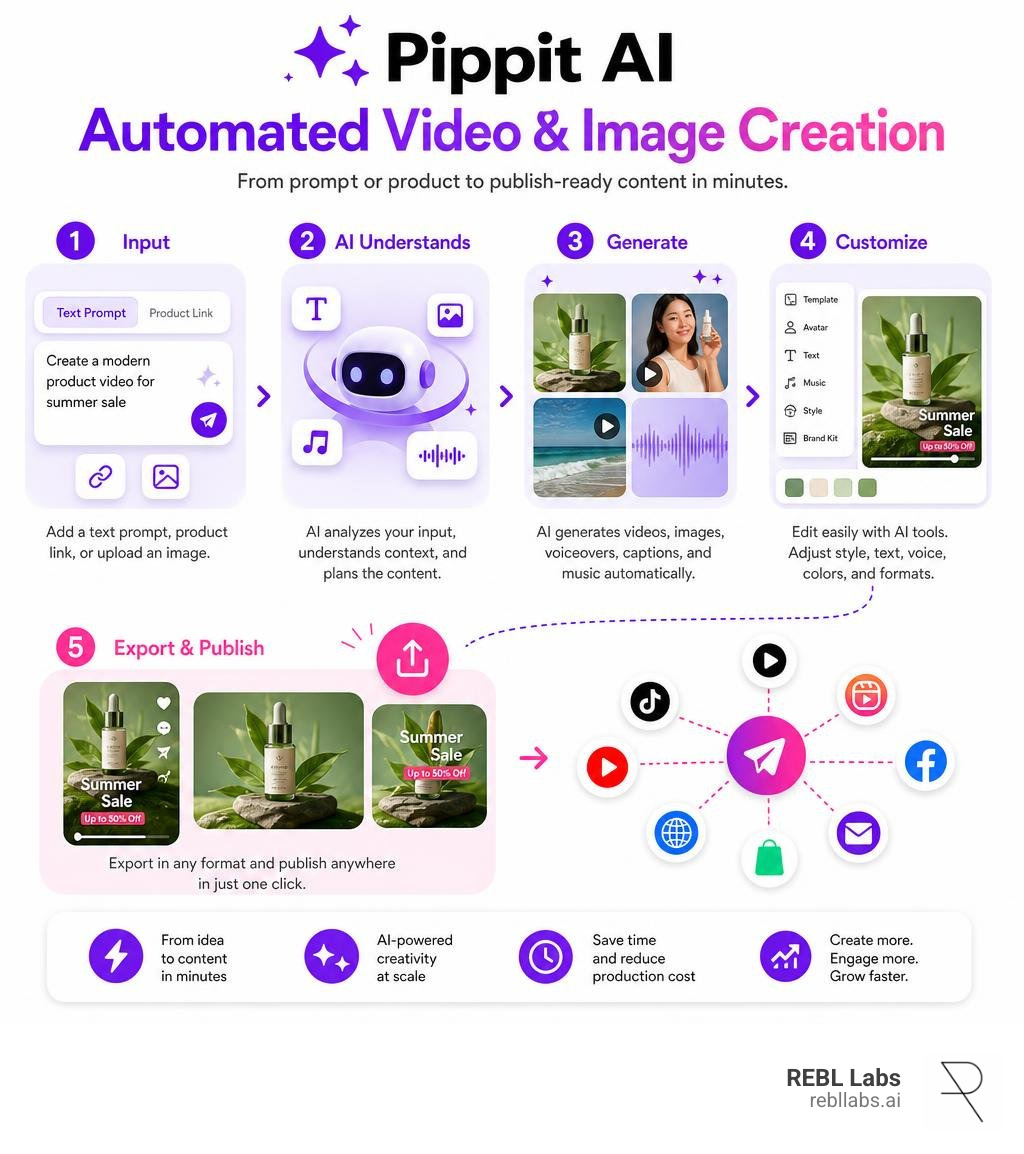
Instead of opening a video editor, hiring a designer, or booking a studio shoot, you paste a product link or upload a photo, type what you want, and Pippit generates a fully edited video — complete with captions, music, voiceovers, and transitions.
Businesses using Pippit AI have reported a 25% jump in TikTok engagement and a 15% drop in website bounce rates after switching to AI-generated content. The platform draws over 4.5 million monthly visitors, which signals it’s solving a real and widespread pain point.
I’m REBL Risty, and after 16 years running a marketing agency and testing dozens of AI tools since 2023, I’ve seen how much time and overhead platforms like Pippit AI can eliminate from a content workflow. Let’s break down exactly how it works and whether it’s right for your business.
What Is Pippit AI and How Does It Work?
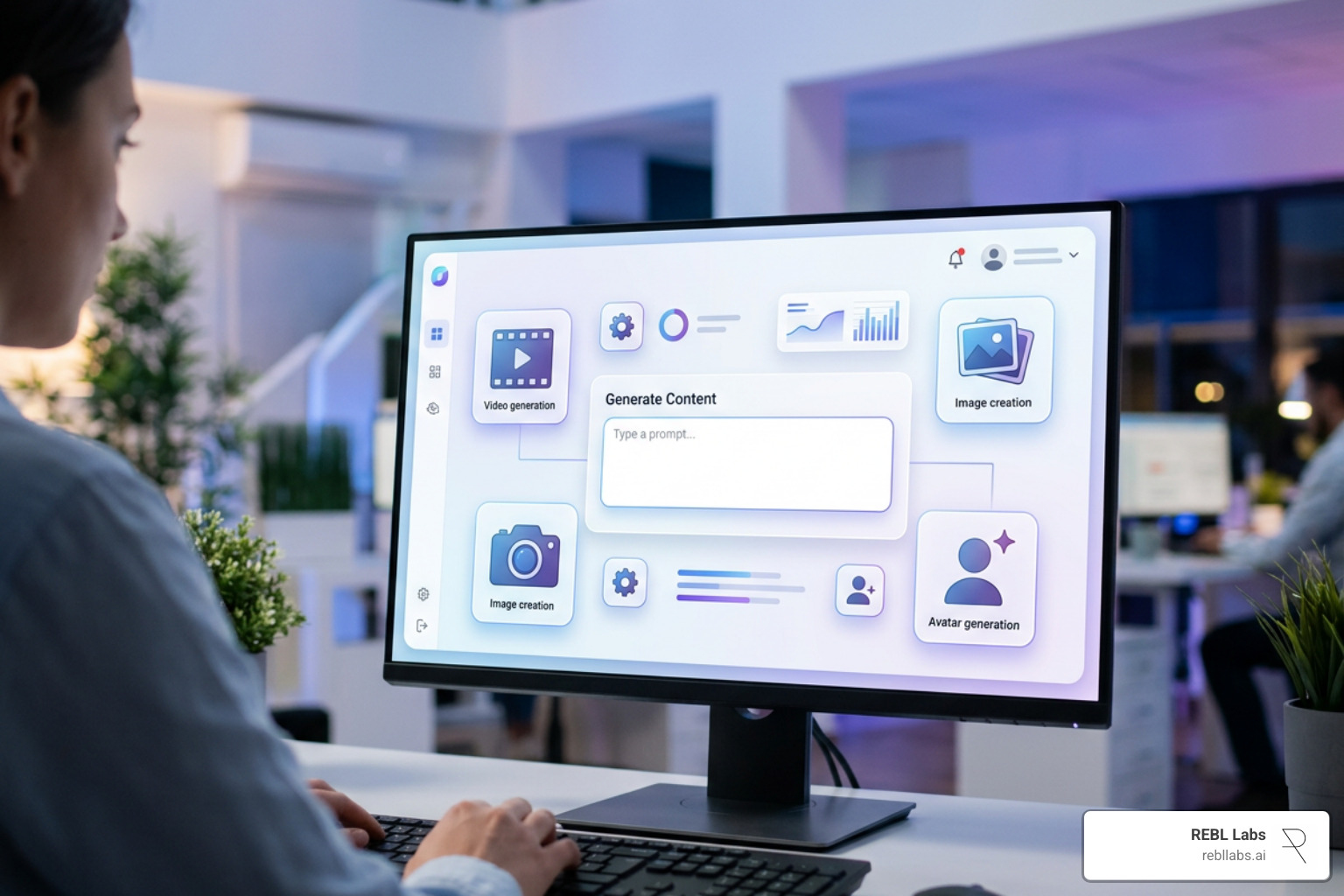
At its core, pippit ai functions as a conversational creative agent rather than a traditional, complex video timeline editor. Instead of spending hours keyframing, slicing audio tracks, or manually adjusting color layers, you communicate directly with an intelligent system that understands context, visual aesthetics, and brand strategy.
When you interact with pippit ai, you can feed it multi-modal inputs: plain text prompts, existing visual files, product links from storefronts like Shopify or Amazon, and style reference assets. The system parses your input, identifies the key selling points or narrative goal, and coordinates multiple specialized underlying generative models to turn your idea into a finished visual deliverable.
What makes this conversational approach unique is asynchronous task management. While the system renders your HD video ad or multi-angle product catalog shoot in the background, you can continue chatting with the Video Agent to queue up your next batch of visual assets.
Pippit AI Core Architecture and Developer
To understand why pippit ai feels so tightly integrated with short-form video trends, it helps to look at its origin. The platform was launched in May 2025 by technology giant ByteDance (known in Chinese as Xiǎoyúnquè, or Little Lark). ByteDance engineered Pippit directly on top of the robust CapCut rendering engine, creating a seamless connection between automated media generation and social-first distribution pipelines.
By leveraging ByteDance’s extensive infrastructure, Pippit AI: Free AI Video Generator | Your Smart Creative Agent bridges the gap between raw generative models and actual social commerce execution. It was explicitly built to service TikTok Shop sellers, Instagram marketers, and digital-first brands that need to pump out dozens of high-performing visual variations every week.
Today, the platform receives over 4.5 million monthly visits, maintaining a global web ranking near #11,187 with an astonishingly low bounce rate of 0.4%. Traffic spans key global markets including Brazil (19%), Indonesia (10%), Vietnam (6%), the United States (6%), and Colombia (4%). Its agile development team is distributed across 9 countries—including Indonesia, India, the Philippines, Pakistan, and Vietnam—ensuring continuous model updates and platform optimizations.
Underlying Models Behind Pippit AI Content Generation
Pippit doesn’t rely on a single monolithic algorithm. Instead, it operates as a multi-model ecosystem, routing your prompt to whichever engine is best suited for the job:
- Seedance 2.5: The flagship video generation engine. Seedance 2.5 supports up to 50 multimodal reference assets simultaneously, allowing you to lock down strict visual character, lighting, and environmental consistency across long sequences. It generates up to 30-second clips in a single pass with precise timestamp control, timeline-based frame editing, and native green-screen controls.
- Seedance 2.0 Mini: A lightweight, cost-effective rendering model capable of outputting sharp 720p social videos at prices as low as $0.02 per second.
- Seedream 5.0 Pro: The hyper-realistic photo engine designed for studio-grade product photography, impasto rendering, pixel art, pop art, and custom artistic posters.
- Nano Banana Pro: The specialized text-to-motion graphics and typography engine that synchronizes motion graphics directly to voice tracks, sound effects, and audio beats.
- Short Drama Agent: An advanced framework introduced in early 2026 that allows creators to feed long-form scripts (up to 100,000 words) into the engine to automatically produce multi-episode short video series of up to 100 episodes.
Key Features of the Pippit AI Creative Platform
The pippit ai ecosystem consolidates tools that used to require four or five separate software subscriptions into one streamlined workspace.
Video Agent and Multi-Asset Story Studio
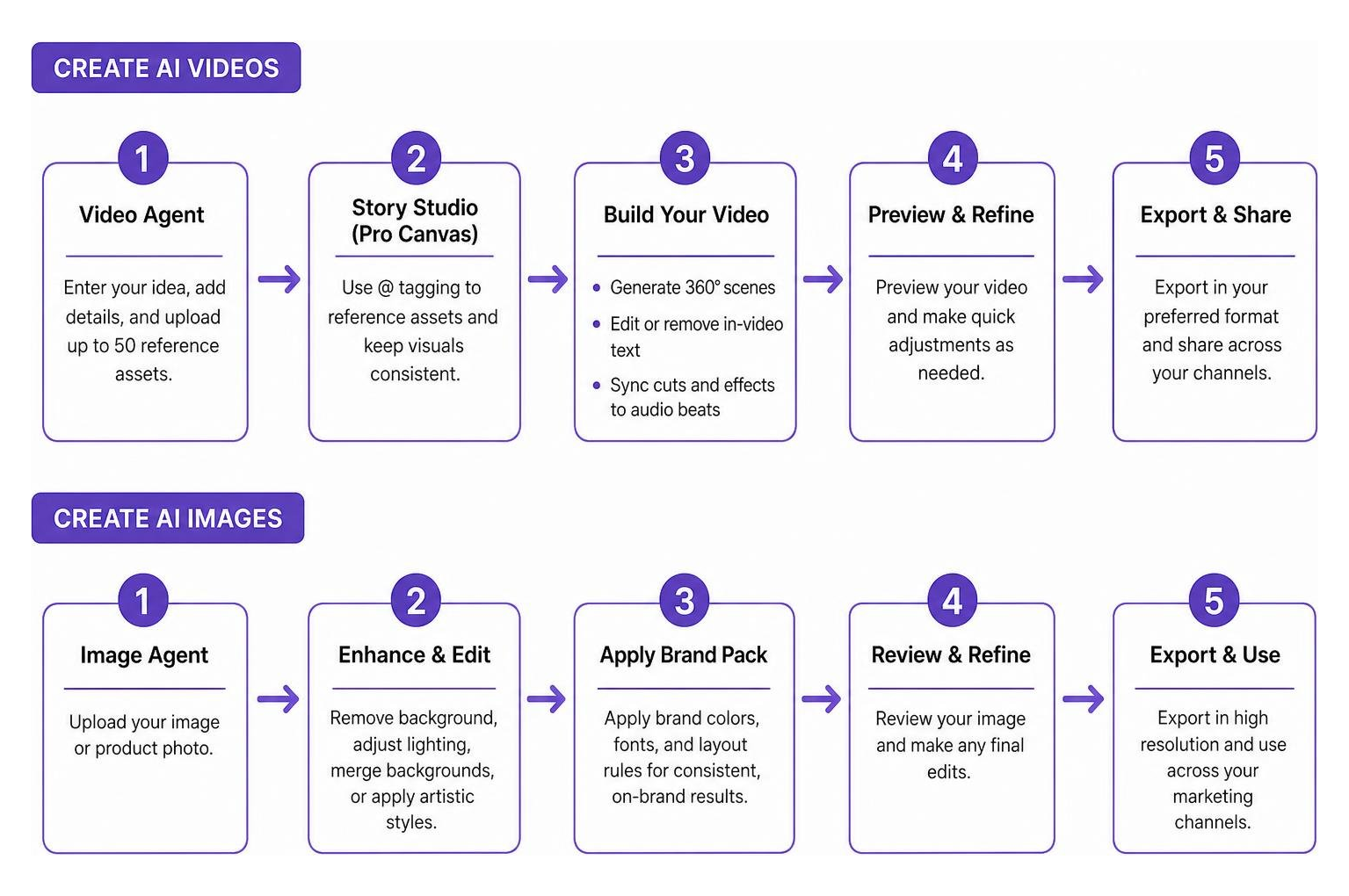
The Video Agent serves as your primary production partner. Rather than prompting a blank video generator and hoping for the best, the Video Agent allows you to combine text commands with up to 50 reference assets (such as character sheets, lighting styles, or product photos).
Inside the platform’s Story Studio, creators gain access to a unified Pro Canvas workspace featuring:
- Asset Referencing (
@tagging): Tag pre-uploaded brand logos, background scenes, or character turnaround sheets directly in your prompt text to force visual consistency across multiple scene renders. - 360° Panorama Generation: Generate expansive, immersive environment backgrounds for product staging or narrative scenes.
- In-Video Text Modification: Easily edit or erase outdated pricing, promotional text, or seasonal messaging inside existing video files without having to re-render or re-shoot the original footage.
- Audio-Driven Beat Sync: Automatically align cuts, visual transitions, and text pop-ups to the rhythm of uploaded background music or synthetic voice tracks.
If you are looking to create high-impact kinetic typography, animated promotional overlays, or social channel teasers, you can explore specialized tools like Pippit: Create AI Motion Graphics with Ease to streamline your video pipeline even further.
Image Agent, Digital Avatars, and AI Motion Graphics
Beyond video, pippit ai provides deep visual asset creation capabilities tailored specifically for commercial catalog design:
- Image Agent: Features instant background removal, smart subject isolation, background merging, lighting adjustment, and artistic style transformations (such as converting standard retail shots into 3D Anime or luxury editorial styles).
- Digital Avatars: Select from dozens of photorealistic AI presenters, 3D animated avatars, or operatic personas to host explainer videos, educational courses, and product walkthroughs.
- Talking Photos: Turn any static headshot into a fully synchronized speaking presenter simply by uploading an audio file or entering a written transcript. The system automatically animates lip movements, eye blinks, and natural micro-facial expressions.
- Brand Packs: Enterprise and agency teams can lock in specific hex colors, brand fonts, logo safety zones, and layout rules within Nano Banana Pro, ensuring all generated motion graphics strictly follow corporate design guidelines.
Step-by-Step Guide: Generating Videos and Images
To help you get up to speed quickly, let’s walk through the exact steps for producing e-commerce marketing assets using pippit ai.
Creating E-Commerce Videos with the Video Agent
Creating a high-converting short-form video ad for TikTok, Instagram Reels, or YouTube Shorts takes less than five minutes:
- Navigate to the Video Agent: Log into your account and select the Video Agent workspace from the main dashboard.
- Input Product Link or Reference Media: Paste an active e-commerce product URL (from TikTok Shop, Amazon, Shopify, etc.) or upload 1 to 5 clear product photographs.
- Write Your Prompt Brief: Enter a descriptive prompt detailing the scene setup, mood, and target narrative. For example: “Create a dynamic 15-second promo video for this luxury leather handbag. Place the bag on a sleek marble surface with warm natural sunlight filtering through leaves. Add energetic background music, bold animated price text, and a upbeat voiceover.”
- Configure Generation Parameters:
- Aspect Ratio: Choose
9:16for TikTok/Reels,16:9for YouTube/Desktops, or1:1for feed posts. - Language & Voice: Select from over 20 supported languages and pick a target AI voice profile that fits your brand persona.
- Duration: Set target clip duration (e.g., 15 or 30 seconds).
- Aspect Ratio: Choose
- Execute and Refine: Click Generate. While the Video Agent processes the clip, you can review the generated transcript, swap background music, modify text overlays, or queue up your next video request.
- Export or Auto-Publish: Download your rendered high-definition MP4 file or schedule direct publication to your TikTok and Instagram accounts.
Designing Visuals with the Image Agent
If you need polished product photography for website banners, Amazon listings, or social graphics, follow this workflow:
- Open the Image Agent: Select Create Image from the platform tools tab.
- Upload Base Image or Type Prompt: Upload a raw photo of your item (e.g., a cosmetic perfume bottle shot on a plain desk) or describe the desired image from scratch.
- Apply Background Eraser & Swapping: Select the Remove Background tool to isolate your product cleanly.
- Describe the Background Setting: Enter a background replacement prompt like: “Place the perfume bottle on a rustic tree trunk surrounded by fresh moss, soft morning mist, and warm golden hour sunlight.”
- Select Style Preset & Aspect Ratio: Choose your preferred aesthetic (e.g., Realistic Photography, Impasto, Pixel Art) and output aspect ratio (such as
3:4or1:1). - Upscale and Download: Fine-tune details using built-in inpainting or outpainting tools, upscale the image to crisp high resolution, and save the file.
Pippit AI Pricing Plans and Credit Breakdown
Pippit operates on a transparent credit-based freemium model. Every major action—whether rendering a 720p video clip, generating a high-resolution poster, or outputting a talking avatar segment—consumes a set number of credits.
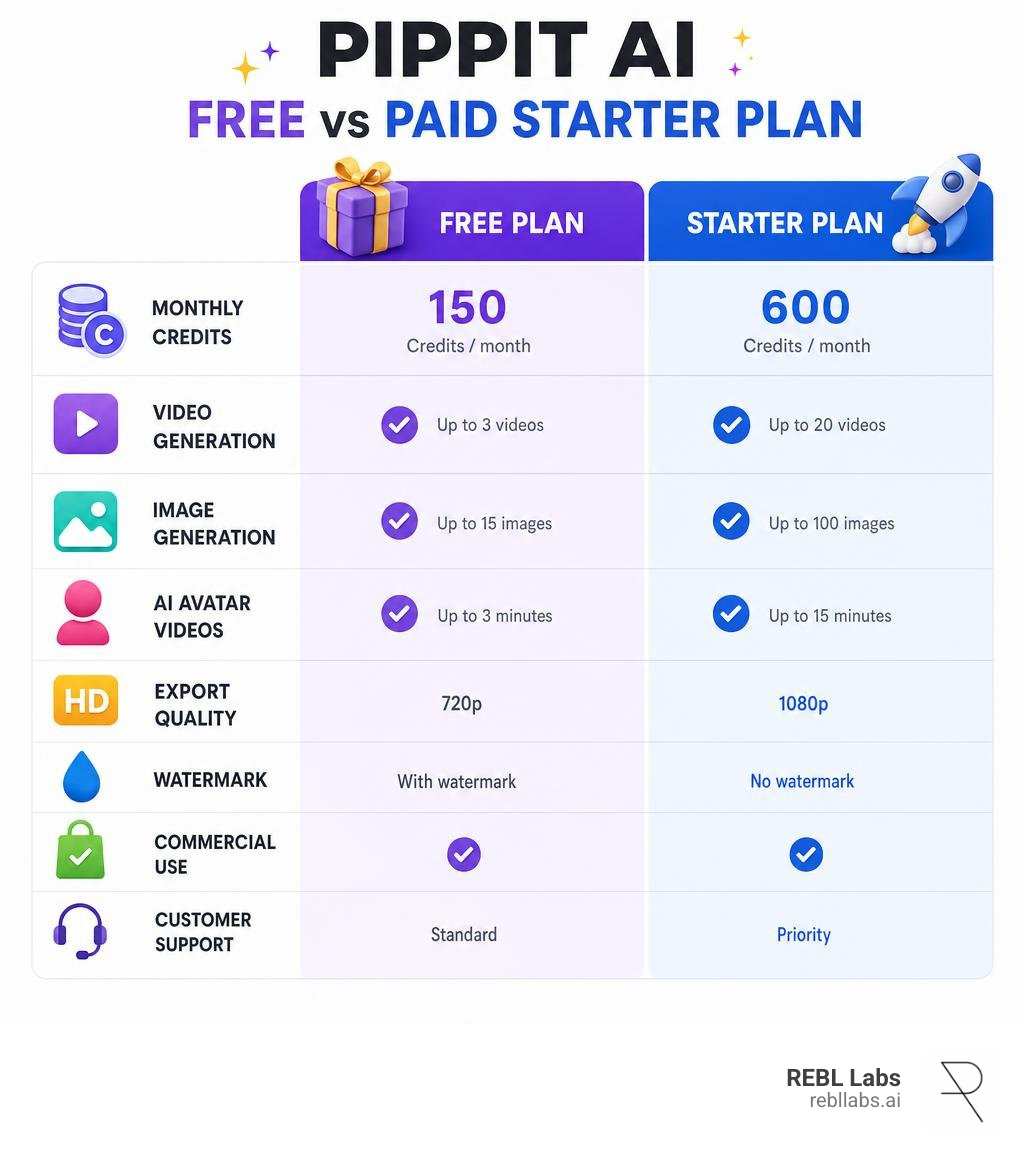
Free vs. Starter Plan Comparison
The platform offers two primary tiers tailored to individual creators and scaling marketing teams:
| Feature / Specification | Free Plan | Starter Plan |
|---|---|---|
| Monthly / Annual Cost | $0 / month (No credit card required) | $24.17 / month (Billed annually at $289.99/yr) |
| Credit Allocation | 150 credits per week (Refreshes weekly) | 21,600 credits per year |
| Video Production Capacity | ~2 minutes of video per week | Up to 360 minutes of video per year |
| Image Generation Capacity | Up to 75 images per week | Up to 108,000 static visuals / posters per year |
| Cloud Storage | 500 GB cloud asset storage | 500 GB cloud asset storage |
| Commercial Usage Rights | Included (Cleared for commercial ads) | Included (Full commercial rights) |
| Social Auto-Publishing | Manual download & export | Direct auto-scheduling to TikTok & Instagram |
| AI Models Included | Seedance Mini, Seedream, Basic Avatars | Seedance 2.5, Seedream 5.0 Pro, Nano Banana Pro |
For small testing budgets or creators launching their first storefront, the Free plan provides more than enough bandwidth to produce 6 to 8 short social clips per month. High-volume agencies and e-commerce stores running daily ad campaigns will benefit from upgrading to the Starter plan for access to advanced models like Seedance 2.5 and direct social auto-scheduling.
Commercial Rights, Language Support, and Platform Benefits
When evaluating any generative AI tool for business operations, legal clarity and global scalability are critical factors.
Global Reach and Commercial Licensing
One of the greatest advantages of pippit ai is its straightforward commercial licensing policy. Content created under both the Free and Starter tiers is fully cleared for commercial deployment. This means you can freely run generated visual assets in paid ad campaigns on TikTok, Meta, or Google, incorporate them into Amazon storefronts, or use them in client deliverables without worrying about licensing strikes or royalty claims.
Furthermore, Pippit is designed from the ground up for international social commerce. The platform native audio engine supports 20+ languages (including English, Spanish, Portuguese, Indonesian, Vietnamese, Hindi, Mandarin, and German) paired with 50+ natural-sounding AI voices.
For brands looking to launch international campaigns, this means you can take a single English product video script, translate the dialogue, and re-render the video with localized voiceovers and translated text captions in seconds. Real-world brand data demonstrates that localized video ads generated via Pippit achieve up to a 25% higher engagement rate on TikTok compared to static posts or un-localized videos.
Pros and Cons of Pippit AI
To help you decide if pippit ai fits into your current tech stack, here is an honest summary of its core strengths and operational limits:
Pros:
- Massive Time Savings: Reduces short-form marketing video production timelines from days down to minutes.
- E-Commerce Native: Generates full video ads, script copy, voiceovers, and captions directly from simple product links.
- Commercial Clearance: Full commercial rights provided on both Free and paid plans.
- Multi-Model Ecosystem: Combines elite models (Seedance 2.5, Seedream 5.0, Nano Banana Pro) under a single roof.
- Budget Friendly: Generous weekly free credits (150/week) with paid plans starting under $25 per month.
- Localization Ready: Supports multi-language translation across 20+ global languages.
Cons:
- Credit Consumption Rates: High-definition 4K renders and extended 30-second Seedance 2.5 video clips consume weekly free credits rapidly.
- Mobile App Rating Variances: While the desktop web dashboard is feature-rich, standalone iOS/Android mobile iterations possess modular limitations that require manual text copying for slides.
- Processing Queues During Peak Hours: Rendering multi-asset videos during peak traffic periods can occasionally cause minor queue delays.
Frequently Asked Questions About Pippit AI
Is Pippit AI completely free to use for commercial projects?
Yes! The Free plan provides 150 credits every week with no credit card required upon sign-up. All assets, videos, and photos generated using free credits carry commercial usage clearance, meaning you can use them in social ads, storefront listings, and marketing materials immediately.
How does Pippit AI differ from standard video editing applications?
Traditional editing tools (like standard desktop video editors) rely on manual timeline editing where you must cut clips, build keyframe animations, record voiceovers, and line up typography manually. Pippit AI operates as an automated creative agent: you provide an input link, image, or text prompt, and the system automatically handles scriptwriting, video assembly, voiceover synthesis, captioning, and beat synchronization.
What video aspect ratios and export formats are supported?
Pippit AI supports all standard digital video aspect ratios, including 16:9 (landscape widescreen), 9:16 (vertical mobile short-form), 1:1 (square social feed), and 3:4 (portrait catalog format). Rendered videos can be downloaded in high-definition MP4 or MOV video formats.
Conclusion
The landscape of digital marketing and e-commerce content production has shifted permanently. Businesses no longer have to choose between spending thousands of dollars on agency video shoots or settling for quiet, static image posts that get buried by social media algorithms.
By combining ByteDance’s video processing technology with advanced models like Seedance 2.5 and Nano Banana Pro, pippit ai gives e-commerce brand owners, social media managers, and small businesses the power to run a full-scale video production studio right from a web browser.
At REBL Labs, we specialize in helping businesses integrate cutting-edge AI teammates and automated visual pipelines to slash production overhead, convert cold leads, and scale revenue 24/7 with zero technical friction. If you want to build a comprehensive digital marketing strategy that turns automated video creation into measurable business growth, explore our complete guide to Automated AI Video Creation and see how AI-driven workflows can transform your brand today.

Meet REBL, the AI expert and CEO of REBL Labs AI. She’s the go-to AI authority who helps businesses navigate the future of marketing automation. Known for making AI approachable and actionable, REBL is a sought-after speaker in the AI space, turning complex tech into business wins. She’s here to ensure that every business can scale smarter, faster, and with zero guesswork.


